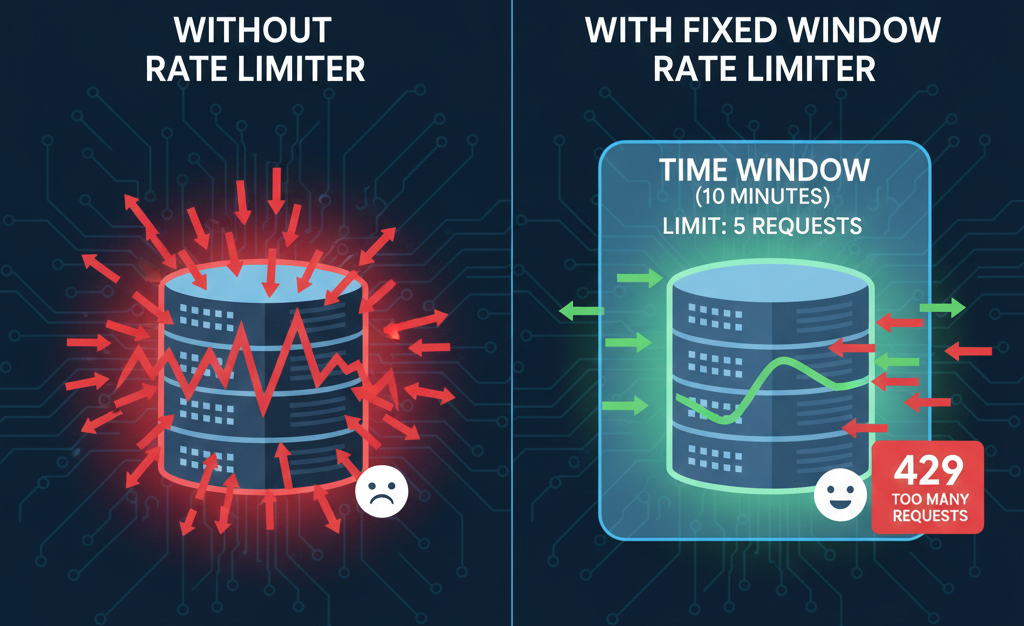
Have you ever experienced an API receive far more calls than expected?
Sometimes a system sends requests too quickly, a script keeps retrying, or traffic suddenly spikes. When that happens, the API can get overloaded. Response times slow down, CPU usage increases, and in some cases the server may stop responding entirely.
Even a small mistake or bug can push an API beyond its limits if there is no control over how many requests are allowed in a given time. This is where rate limiting becomes essential for keeping the system healthy and stable.
This blog focuses on the Fixed Window Rate Limiter, which is one of the simplest and most reliable way to manage traffic in ASP.NET Core.
Rate Limiting: What Is It?
Rate limiting controls how often users or systems can call an API.
It helps the system stay secure and stable when:
Traffic suddenly increases
Scripts or scheduled jobs repeatedly make calls
Brute-force attacks or accidental request floods occur
With rate limiting in place, the API stays fair and consistent for all clients.
For a general introduction to ASP.NET Core rate limiting, refer to the first blog in this series:
What Is a Fixed Window Rate Limiter?
The Fixed Window limiter divides time into fixed windows. Each window has a set number of requests allowed. After the limit is reached, any extra requests in that same time window are rejected. When the next window begins, the counter resets and new requests are allowed again.

Simple explanation
Time is divided into fixed windows (e.g., every 10 minutes)
Only a certain number of requests are allowed in each window (e.g., 5 requests)
Once the limit is crossed, all extra calls are blocked until the next window starts
This method works well for predictable traffic and internal systems where usage patterns don’t vary much.
Example Scenario
Imagine an API that generates an Inventory Report.
The report is heavy and takes time to process.
Typically, it receives 2–5 calls every 10 minutes. But because of a scheduling issue, the API suddenly received 40+ requests in the same 10-minute window. This overloaded the database and affected the entire system.
What Happened Without a Rate Limiter
CPU usage went higher than usual
Report processing time increased
Other APIs slowed down
System stability dropped
What Happened After Adding a Fixed Window Limiter
Only 5 requests were allowed every 10 minutes
Extra calls were immediately blocked
CPU usage dropped
Report generation became faster
The system remained stable and responsive
This shows how even a simple rate limiter can protect a system from unplanned load.
Below is a sample implementation of a Fixed Window limiter:
using Microsoft.AspNetCore.RateLimiting;

var builder = WebApplication.CreateBuilder(args);

builder.Services.AddControllers();
builder.Services.AddEndpointsApiExplorer();

builder.Services.AddRateLimiter(options =>
{
    options.AddFixedWindowLimiter(
        "InventoryReportLimit",
        limiterOptions =>
        {
            limiterOptions.PermitLimit = 5;                 // Allow 5 API calls
            limiterOptions.Window = TimeSpan.FromMinutes(10); // Per 10 minutes
            limiterOptions.QueueLimit = 0;                  // No queuing
        });

    options.OnRejected = async (context, cancellationToken) =>
    {
        context.HttpContext.Response.StatusCode =
            StatusCodes.Status429TooManyRequests;

        await context.HttpContext.Response.WriteAsync(
            "Too many report requests. Try again later.",
            cancellationToken);
    };
});

var app = builder.Build();

app.UseRouting();
app.UseRateLimiter();

app.MapControllers();

app.Run();
This configuration allows only five requests every ten minutes. Any additional requests during that window are rejected.
Advantages of Fixed Window Rate Limiter
Prevents sudden traffic spikes from overloading the API
Keeps the system stable by controlling how many requests enter
Simple to understand and configure
When to Use the Fixed Window Limiter
Use this limiter when:
Traffic is consistent and predictable
Simple rate-limit rules are enough
Internal or partner systems call the API
A fixed number of requests per time window is acceptable
When Not to Use the Fixed Window Limiter
Avoid this limiter when:
Traffic fluctuates heavily
Smoother request distribution is needed (Sliding Window is a better option)
Short-term bursts need to be allowed (Token Bucket is a better option)
The goal is to limit concurrent execution rather than request count (Concurrency Limiter is a better option)
Summary
The Fixed Window Rate Limiter is an easy and effective way to protect APIs from heavy or unexpected traffic. It divides time into fixed intervals and allows only a certain number of requests within each interval. When applied correctly, it keeps the API fast, stable, and fair for all clients.
If you want to explore more rate limiting techniques, check out our other blogs on Sliding Window, Token Bucket, and Concurrency limiters.
References
Related Blogs

Introduction To Rate Limiting Middleware in ASP.NET Core
Discover how rate limiting middleware boosts performance in ASP.NET Core

Sliding Window Rate Limiter in ASP.NET Core: What is it and when to use it?
Sliding Window Rate Limiting to balance bursty traffic and protect ASP.NET Core APIs.

Token Bucket Rate Limiter in ASP.NET Core: What is it and when to use it?
Token Bucket rate limiting to support burst traffic while protecting ASP.NET Core APIs from overload.