.NET 10 adds two useful improvements to QuickGrid: RowClass for conditional row styling and HideColumnOptionsAsync() for closing column option panels programmatically. This post covers how both work, with a complete implementation example.
For a general introduction to QuickGrid and its core features, refer to our previous blog: "Blazor and .NET 8 QuickGrid Implementation."
At Atharva ITS, we use QuickGrid in several client projects for displaying and managing structured datasets in Blazor applications. These two additions make it meaningfully more practical.
Challenges before .NET 10
Applying conditional row styling required CSS selectors or template-based workarounds - developers had to inject conditional classes inside <TemplateColumn> markup or write CSS targeting specific data attributes. That mixed styling logic with markup and added complexity that grew with the number of conditions.
Column option panels used for filtering had no built-in way to close them programmatically. After a user applied a filter, the panel stayed open. Closing it required custom JavaScript or additional UI state management.
Implementation example
The implementation of QuickGrid in .NET 10 is largely the same as in .NET 8. The primary changes are a few new capabilities that improve usability and customization.
For example, .NET 10 introduces a new RowClass parameter in the QuickGrid component for conditional row styling, along with a built-in method HideColumnOptionsAsync() that allows the column options panel to be closed programmatically.
Click here to download full code for the .NET 10 QuickGrid implementation.
Feature 1 - Conditional row styling using RowClass
In data-driven applications, visually highlighting rows based on business conditions improves readability - inactive users, failed transactions, suspended accounts, warning states.
.NET 10 introduces the RowClass parameter, which accepts a method reference. QuickGrid calls this method for each row during rendering and applies the returned CSS class to the <tr> element directly.
<QuickGrid TGridItem="UserInfoModel" Items="@Items" RowClass="GetRowClass">
     u.Name" />
     u.Status" />
</QuickGrid>

@code {
    private string GetRowClass(UserInfoModel user)
        => user.Status == "Deactivated" ? "table-danger" : "";
}
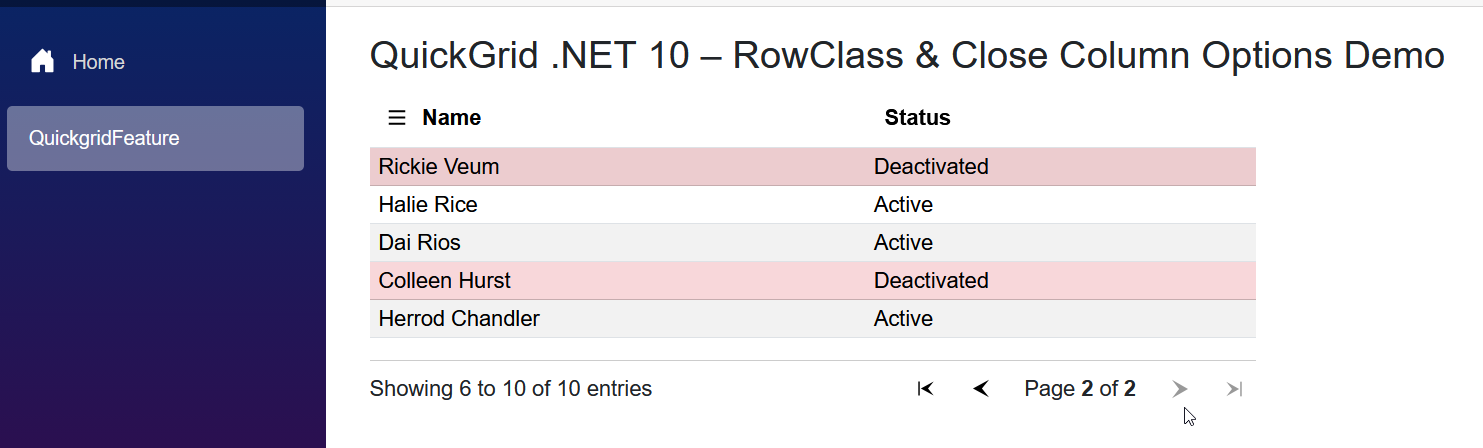
The method receives the current row item, evaluates the condition, and returns a CSS class name - or an empty string for no styling. In this example, any user with Deactivated status gets Bootstrap's table-danger class, which applies a red background.
The rendered HTML for a deactivated row:
<tr class="table-danger">Row styling is now pure C# logic - no template manipulation, no extra CSS selectors.
Feature 2 - Closing column options using HideColumnOptionsAsync
.NET 10 adds HideColumnOptionsAsync() to the QuickGrid instance. Call it after any action that should dismiss the panel:
async Task ApplyNameFilter()
{
    Items = string.IsNullOrWhiteSpace(nameFilterVal)
        ? _userInfoList.AsQueryable()
        : _userInfoList
            .Where(x => x.Name.Contains(nameFilterVal,
                StringComparison.OrdinalIgnoreCase))
            .AsQueryable();

    if (quickGrid != null)
        await quickGrid.HideColumnOptionsAsync();
}
The grid instance is captured using @ref="QuickGrid". After filtering completes, HideColumnOptionsAsync()closes the panel automatically.
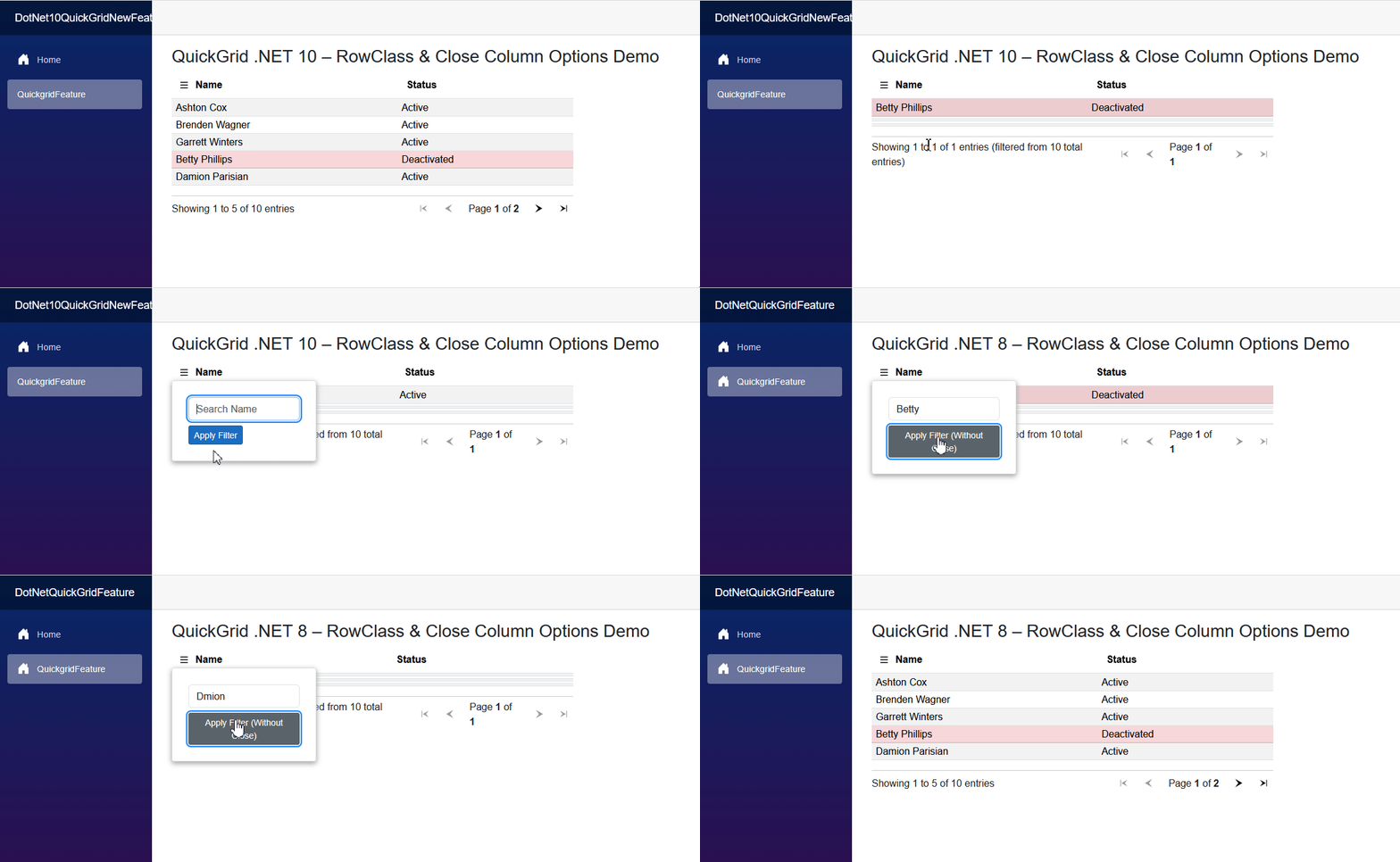
Without HideColumnOptionsAsync
User opens column options
Enters search value
Clicks Apply Filter
Grid updates
Panel stays open
With HideColumnOptionsAsync
User opens column options
Enters search value
Clicks Apply Filter
Grid updates
Panel closes automatically
This is the behaviour developers expect from any production-grade data grid. QuickGrid now handles it natively, without custom JavaScript.
Summary
RowClass and HideColumnOptionsAsync() are small additions with a visible impact. Row styling becomes a single C# method instead of a markup workaround. Filter panels now close when they should. Both improvements make QuickGrid more practical for dashboards and data-heavy admin interfaces.
At Atharva ITS, we build Blazor and .NET applications for clients in the US, UK, and Europe. If you're working on a data-intensive Blazor application or evaluating a development partner for your .NET project, get in touch.