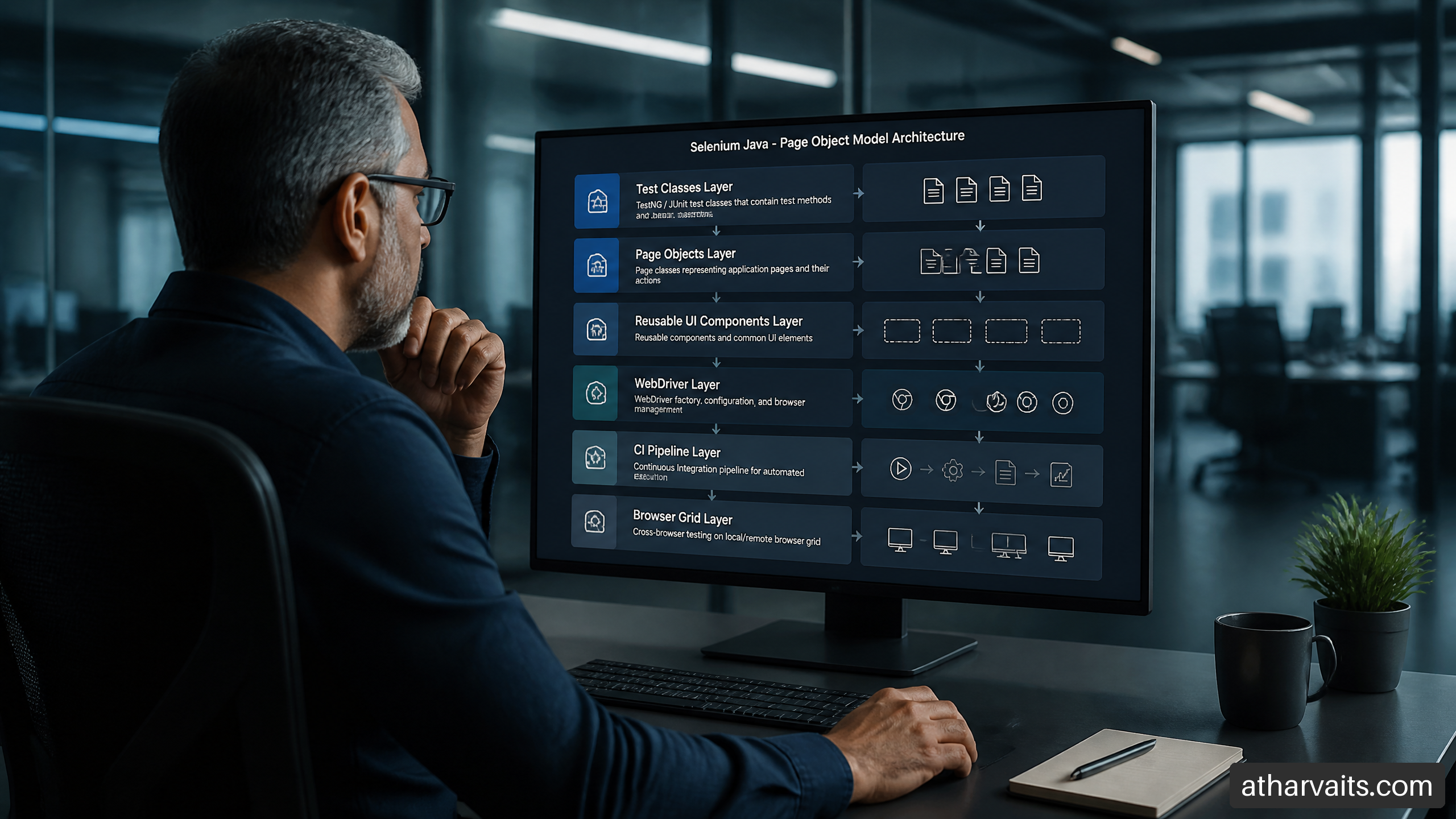
Building scalable page object model test framework with selenium java is not about creating a BasePage, adding a few locators, and calling it architecture. I have seen that movie. It ends with a 2,000-line base class, a Thread.sleep() collection large enough to make anyone nervous, and test failures nobody wants to own.
A scalable POM (Page Object Model) framework should make ordinary test work boring: engineers add a feature, create or reuse a page or component object, supply predictable test data, and get useful failure evidence in CI/CD (Continuous Integration/Continuous Deployment). The framework should absorb UI change without forcing the entire test suite into a maintenance sprint.
The core rule: tests describe business intent; page and component objects describe UI interactions; framework services handle browser lifecycle, waits, data, reporting, and diagnostics.
Table of Contents
Architecture and design boundaries
Key takeaways
Define the right POM boundary
Structure modules for team-scale work
Use component objects instead of giant page classes
Reliability, scale, and delivery
Build stable waits and locator rules
Support parallel execution safely
Add observability and CI/CD behavior
Refactor legacy script-style suites
FAQ and references
Key Takeaways
What I recommend first
Model pages around user-facing capabilities, not every HTML container.
Treat reusable UI fragments such as navigation, modals, grids, and date pickers as component objects.
Keep WebDriver lifecycle, waiting, test data, reporting, and screenshots outside page objects.
Use plain
Bylocators for most large suites because they are explicit, easy to debug, and less magical than PageFactory.Design for parallel execution before enabling it. Adding
parallel=trueto a suite with a shared driver is not scaling; it is a lottery.
The decisions that prevent expensive maintenance
Decision | Recommended default | Choose it when | Avoid it when |
Page object scope | One meaningful page or view | A screen has distinct user actions and state | The behavior belongs to a reusable fragment |
Component object scope | Header, modal, table, picker, card | The same UI behavior appears across pages | It is used once and adds no meaningful abstraction |
Locator style | Plain | You need explicit waits and readable failures | A small legacy suite is already consistently built around PageFactory |
Assertions | Test layer, with limited component state checks | You are validating business outcomes | A page object is becoming a second test suite |
Driver ownership | One driver per test thread | Running parallel browser sessions | Tests intentionally share browser state, which is usually a smell |
Define the POM Boundary Before Writing Classes
What POM should actually represent
A Page Object Model is an interface between test intent and browser mechanics. A test should be able to say checkoutPage.placeOrder()rather than locate six elements, scroll twice, wait for an animation, and hope the submit button is still attached to the DOM.
Honestly, the usual beginner definition of POM is not wrong. It is just incomplete for an enterprise suite. The real question is: what changes together? If a checkout form, its validation rules, and its submit behavior change as one UI unit, they belong together. If a global header appears on twenty screens, it should not be copied into twenty page classes.
A healthy test reads like a workflow:
@Test
void registeredCustomerCanCompleteCheckout() {
    <a target="" data-router-slot="disabled" href="http://homePage.open" type="external">homePage.open</a>();
    productPage = homePage.searchFor("wireless headphones").openFirstResult();
    cartPage = productPage.addToCart();
    checkoutPage = cartPage.proceedToCheckout();

    orderConfirmationPage = checkoutPage.completeOrder(customer, paymentCard);

    assertThat(orderConfirmationPage.orderNumber()).isNotBlank();
}
The test owns the assertion because it owns the scenario. The page object owns the clicks, typing, synchronization, and navigation transition because it owns browser interaction.
When a page object is the wrong abstraction
Let’s be real here: POM is not a sacred artifact. A page-centric model becomes awkward when the interface is primarily a workflow builder, a highly dynamic dashboard, or a canvas-style application where the same controls behave differently by state.
UI situation | Better abstraction | Why |
Standard account, catalog, cart, or checkout pages | Page objects plus components | The UI has stable screens and recognizable transitions |
Shared navigation, filters, data grids, dialogs | Component objects | Reuse prevents duplicated selectors and interaction code |
Multi-step onboarding flow | Flow or task object | The behavior crosses pages and is meaningful as a business process |
Dynamic low-code builder or drag-and-drop canvas | Domain actions plus focused components | The screen boundary is less stable than the user operation |
API-heavy setup with minimal UI verification | API fixture plus thin UI checks | UI setup is slow and unnecessarily brittle |
I have watched teams create a CustomerJourneyPagewith fifty methods because they wanted one place for everything. That is not a page object. That is a witness protection program for bad design.
Keep assertions at the correct layer
The rule “never put assertions in page objects” is directionally useful, but it is too absolute. Tests should hold business assertions. Components may expose state-check helpers when the check is purely structural and reusable.
For example, checkoutPage.placeOrder()should not assert that the order was successful. It should return an OrderConfirmationPageor throw a useful interaction failure if the UI cannot transition. But a reusable Toastcomponent can reasonably expose isSuccessMessageVisible()because it reports UI state without deciding whether that state satisfies a business requirement.
Layer | Owns | Should not own |
Test class | Scenario intent, business assertions, data combinations | CSS selectors, raw waits, browser setup |
Page object | Page actions, transitions, page-level state access | Cross-product workflow orchestration |
Component object | Reusable UI interactions and local state | Full end-to-end assertions |
Framework service | Drivers, waits, configuration, evidence | Feature-specific page behavior |
Plan boundaries with the product, not the DOM
Before I start building a framework, I map features, shared components, critical workflows, and test data dependencies. The objective is not paperwork. It is to stop the team from discovering architecture only after the suite has become painful.
If your product is broad, a lightweight topic map can help identify the major domains and unknowns before implementation. Tools such as Semrush Topic Research and Quattr's topic discovery tool are designed for organizing related subject areas; I would use the same basic discipline internally when mapping product areas and ownership boundaries.
Structure the Java Framework for Growth
Use modules that reflect responsibilities
Most frameworks out there are too rigid; flexibility is key for scalability. I prefer package boundaries that make accidental coupling obvious. A test should not import WebDriverWaitdirectly. A page should not know where a test user came from. A report listener should not know what a checkout button means
Package or module | Responsibility | Typical contents |
| Scenario orchestration and assertions | Checkout tests, account tests, smoke suites |
| Full-page interactions and transitions |
|
| Reusable UI fragments | |
| Driver creation and lifecycle | |
| Synchronization policy | |
| Environment and browser configuration | Config loader, capability builder |
| Test setup and cleanup | User factories, API seeders |
| Typed test data models | |
| Evidence and result enrichment | Screenshot hooks, browser logs, Allure adapters |
This structure is not mandatory. It is a boundary map. If your application is a large modular product, splitting page and test code by business domain can be better than one global Pagespackage. The important part is that a change to the billing UI does not encourage someone to edit the shared driver factory.
Keep the base page small on purpose
A base page should provide common mechanics, not business behavior. Mine usually contains the driver, a centralized wait helper, and safe wrappers for interaction. It does not contain loginAsAdmin(), createCustomer(), or twelve special-case recovery methods from a bad release three years ago.
public abstract class BasePage {
    protected final WebDriver driver;
    protected final Waits waits;

    protected BasePage(WebDriver driver, Waits waits) {
        this.driver = driver;
        this.waits = waits;
    }

    protected void click(By locator) {
        waits.clickable(locator).click();
    }

    protected void type(By locator, String value) {
        WebElement element = waits.visible(locator);
        element.clear();
        element.sendKeys(value);
    }

    protected String textOf(By locator) {
        return waits.visible(locator).getText();
    }
}
That class should feel almost boring. Good. Boring infrastructure is dependable infrastructure.
Prefer constructor injection over hidden globals
Dependency injection does not need a heavyweight container on day one. Passing WebDriver, Waits, configuration, or an API client through constructors makes object dependencies explicit and keeps tests easier to isolate.
public final class LoginPage extends BasePage {
    private final By email = By.cssSelector("[data-testid='login-email']");
    private final By password = By.cssSelector("[data-testid='login-password']");
    private final By submit = By.cssSelector("[data-testid='login-submit']");

    public LoginPage(WebDriver driver, Waits waits) {
        super(driver, waits);
    }

    public HomePage loginAs(String userEmail, String userPassword) {
        type(email, userEmail);
        type(password, userPassword);
        click(submit);
        return new HomePage(driver, waits).waitUntilLoaded();
    }
}
Avoid a static DriverManager.getDriver()call sprinkled through every class. It looks convenient until you need parallel execution, test isolation, alternate browser configuration, or a second driver for an edge case. Then the hidden dependency becomes your bill.
For teams extending Java quality tooling beyond browser automation, strong Java development services can help keep the framework aligned with application engineering standards instead of treating test code as disposable code.
Build components as first-class citizens
The Component Object Model is the scale pattern inside POM. When a modal appears on ten pages, create one ConfimationModal, inject its root locator, and keep all modal-specific behavior there.
public final class ConfirmationModal {
    private final WebDriver driver;
    private final Waits waits;
    private final By root;

    public ConfirmationModal(WebDriver driver, Waits waits, By root) {
        this.driver = driver;
        this.waits = waits;
        this.root = root;
    }

    public void confirm() {
        waits.visible(root).findElement(By.cssSelector("[data-testid='confirm']")).click();
    }

    public boolean isVisible() {
        return waits.isVisible(root);
    }
}
The root locator matters. Without it, component selectors quietly leak across the entire document, and a modal test may click a similarly named button behind the overlay. That kind of failure can waste an afternoon because the screenshot looks plausible while the interaction was completely wrong.
Make UI Tests Reliable Before Making Them Parallel
Centralize waits instead of scattering timeouts
Do not put Thread.sleep()into page objects. I know why people do it: the test failed, the page looked slow, and two seconds seemed cheaper than understanding the condition. It is cheaper only until the suite runs hundreds of times.
An explicit wait should answer a specific question: is the element visible, clickable, absent, stale, or displaying the expected state? Centralizing this in a Waits class creates one policy for timeout values, polling, logging, and useful failure messages.
public final class Waits {
    private final WebDriverWait wait;

    public Waits(WebDriver driver, Duration timeout) {
        this.wait = new WebDriverWait(driver, timeout);
    }

    public WebElement visible(By locator) {
        return wait.until(ExpectedConditions.visibilityOfElementLocated(locator));
    }

    public WebElement clickable(By locator) {
        return wait.until(ExpectedConditions.elementToBeClickable(locator));
    }

    public boolean isVisible(By locator) {
        try {
            visible(locator);
            return true;
        } catch (TimeoutException exception) {
            return false;
        }
    }
}
Treat locators as an engineering contract
A locator is not just a line of test code. It is a dependency on the product UI. If a visual redesign changes class names, a locator based on styling should fail review long before it fails CI.
Locator choice | My view | Use when | Risk |
| Preferred | Product teams can maintain test hooks | Requires an ownership agreement with developers |
Stable semantic attribute | Strong fallback | Labels and accessibility attributes are intentional | Copy changes can still break it |
CSS class | Last resort | No stable attribute exists | Styling refactors create churn |
XPath based on DOM hierarchy | Use sparingly | The relation itself is meaningful | Layout changes break it easily |
Dynamic index | Avoid | Almost never | It selects position, not intent |
I recommend a simple locator governance rule: when a selector breaks due to intentional UI change, update the selector alongside the feature change. Do not make QA discover it after merge. Some teams track locator failures separately from product defects; that can be useful when UI churn is high, because it reveals whether the problem is weak test hooks or genuinely unstable behavior.
Retry only the failure modes you understand
Retries can be useful at infrastructure boundaries: a temporary grid connection problem, a browser startup failure, or a known transient service issue with evidence. Retrying an assertion failure without classification is how a real defect gets promoted to “intermittent.”
Failure type | Retry? | Better response |
Browser session creation failed | Sometimes | Retry once and capture provider or grid logs |
Click intercepted by animation | No blind retry | Fix synchronization or overlay handling |
Assertion shows wrong price | No | File or investigate a product defect |
Test data already exists | No | Create isolated data or clean fixtures |
Remote Selenium Grid timeout | Possibly | Retry with diagnostics and monitor recurrence |
Use test data that can survive parallel runs
Shared users, shared carts, and shared mutable records are common sources of “random” failure. They are not random. The tests are stepping on each other.
I typically choose one of these patterns:
Generate unique data for tests that create records.
Seed deterministic data through APIs or database-safe fixtures when setup must be fast and repeatable.
Reserve read-only data for tests that only inspect UI state.
Clean up created entities through APIs where the product allows it, rather than relying on brittle UI cleanup.
For larger product teams, automation testing services should cover this full delivery loop: test design, stable environments, test data strategy, execution, and failure triage. Browser scripts alone are not an automation strategy.
Scale Execution, Evidence, and CI/CD
Make WebDriver thread-safe by design
Parallel testing requires one isolated WebDriverinstance per executing thread. In Java, ThreadLocal<WebDriver> is a common approach, but the detail people miss is cleanup. If remove() does not run, a long-lived worker may retain an old session reference and create spectacularly confusing failures.
public final class DriverManager {
    private static final ThreadLocal<WebDriver> DRIVER = new ThreadLocal<>();

    private DriverManager() { }

    public static void start(DriverFactory factory) {
        DRIVER.set(factory.create());
    }

    public static WebDriver getDriver() {
        WebDriver driver = DRIVER.get();
        if (driver == null) {
            throw new IllegalStateException("WebDriver was not initialized for this thread");
        }
        return driver;
    }

    public static void quit() {
        WebDriver driver = DRIVER.get();
        if (driver != null) {
            driver.quit();
            DRIVER.remove();
        }
    }
}
The practical rule is simple: no static mutable page state, no shared WebDriver, no reused browser profiles unless the test deliberately needs them, and no test data that assumes it is the only test running.
Decide where browsers should run
Execution option | Best fit | Trade-off |
Local headed browser | Debugging a focused failure | Slow and unsuitable for team-wide execution |
Local headless testing | Fast developer feedback | Can expose rendering differences from headed mode |
Selenium Grid | Teams needing controlled browser distribution | Requires operational ownership and capacity planning |
Managed cloud grid | Distributed teams and broad browser coverage | Adds vendor dependency and execution cost |
CI container execution | Repeatable pipeline jobs | Needs careful browser and artifact configuration |
Selenium Grid is useful when browser concurrency and environment coverage justify it. It is not automatically the first move. A small team with a stable containerized Chrome setup may get more value by fixing test data and diagnostics first.
Capture enough evidence to fix failures remotely
A failed test result that says “element not clickable” is not evidence. It is a shrug in log form.
At minimum, capture these artifacts on failure:
Screenshot with timestamp and scenario name.
Current page URL and browser capabilities.
Page source or a targeted DOM snapshot when practical.
Browser console logs where the driver supports them.
WebDriver command logs or provider session links for remote runs.
Test data identifiers, especially generated user or order IDs.
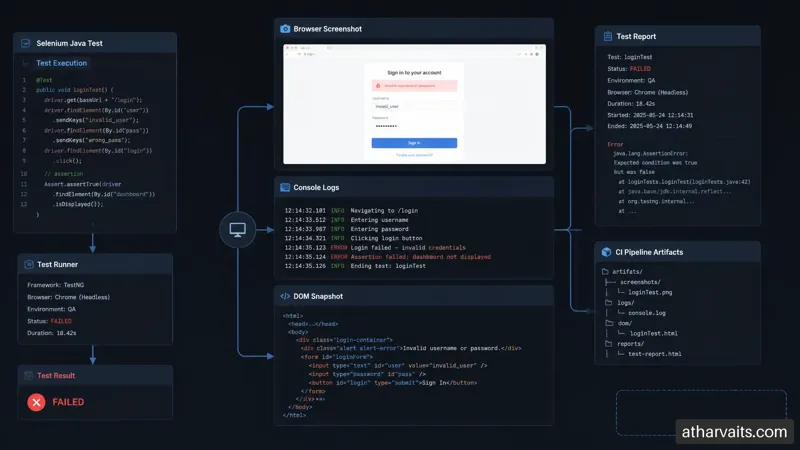
A failure listener can gather these without putting reporting code inside every test. Whether you use Allure Report, ExtentReports, or a custom pipeline artifact store matters less than making evidence consistent. I have inherited suites where a test failed overnight and the only artifact was a stack trace. That is not a test framework; it is an alarm with no address.
Split pipeline feedback by purpose
Do not run every browser, every test, and every data permutation on every pull request. That usually creates a slow queue that engineers learn to ignore.
Pipeline stage | Suggested scope | Purpose |
Pull request | Smoke suite, core browser, headless | Fast regression signal |
Main branch | Broader functional suite, selected browser matrix | Detect integration issues |
Scheduled run | Full regression, cross-browser, longer workflows | Find coverage gaps without blocking commits |
Release candidate | Critical business journeys, production-like settings | Confirm readiness and gather release evidence |
For web products where UI throughput and backend capacity are also release risks, pair functional automation with performance testing services. A fast pass rate does not tell you whether checkout still works when the system is under meaningful load.
Refactor legacy scripts in slices, not with a rewrite fantasy
I rarely recommend stopping feature work to rewrite an entire suite. Start with the most expensive failure cluster or the highest-value workflow, extract a shared component, then move one scenario at a time
Identify scripts with repeated selectors, sleeps, or recurring failures.
Create a small driver and wait layer without changing test behavior yet.
Extract one page or component object around a stable workflow.
Move assertions back into test classes where they express scenario intent.
Replace shared mutable data with fixtures or unique generators.
Add failure artifacts before increasing parallelism.
Retire old helpers only after their replacement is proven in CI/CD.
This is slower than a heroic rewrite for the first week. It is much faster by month three, when the product keeps changing and the old and new worlds need to
FAQ: Building a Scalable Page Object Model Test Framework with Selenium Java
Q1: What is POM in Selenium Java, and how should I structure a large framework?
A: POM maps meaningful UI areas to Java objects so test classes can express user behavior without owning low-level WebDriver details. For a large framework, I separate tests, pages, components, driver management, waits, fixtures, test data, configuration, and reporting.
The important distinction is between pages and components. Use a page object for a full view such as checkout. Use a component object for a header, modal, table, or date picker reused across views. If the same locator appears in five page classes, you probably have a component waiting to be extracted.
Q2: Should I use PageFactory or plain By locators, and where should assertions live?
A: For new enterprise suites, I generally prefer plain Bylocators with explicit waits. They show exactly what is being located and when the lookup occurs. PageFactory can work, especially in a consistent existing codebase, but its proxy behavior can make timing and stale-element diagnosis less obvious.
Assertions should usually live in the test layer. A checkout test decides that an order confirmation is correct. The checkout page handles the actions required to submit. Limited UI-state helpers inside component objects are reasonable, such as checking whether a toast is visible, as long as the component does not start deciding business outcomes.
Q3: How do I handle dynamic elements, flaky tests, and duplicated code?
A: Use explicit waits tied to an observable condition, not fixed sleeps. Wait for visibility, clickability, disappearance of an overlay, URL transition, or a meaningful loading indicator. If an element frequently becomes stale, first ask whether the page re-renders after your action; then re-locate it through a fresh Bylookup rather than storing a WebElementtoo early.
Reduce duplication by extracting shared UI into components and shared technical behavior into small framework services. Do not respond by adding every helper method to BasePage. That is how a useful abstraction turns into a junk drawer
Q4: How do I run POM tests in parallel, compare POM with Screenplay, and know when not to use POM?
A: Parallel execution needs one driver per thread, isolated test data, independent cleanup, and a reporting layer that tags artifacts with the scenario and thread. ThreadLocal<WebDriver>can support the driver part, but it cannot rescue shared accounts or static page state.
Approach | Best for | Limitation |
POM with components | Conventional web apps with stable screens | Can become page-heavy for workflow-driven products |
Screenplay pattern | Large suites with reusable actor tasks and clear domain language | Adds concepts that smaller teams may not need |
Raw WebDriver scripts | Short-lived exploration or a tiny proof of concept | Duplication and maintenance grow quickly |
Avoid a page-centric POM when page boundaries are weak. A drag-and-drop builder, a highly configurable dashboard, or a business flow spanning many views may be clearer with task or workflow objects. This depends on the application. A good clue is whether engineers keep inventing “page” classes that represent a process rather than a screen.
Conclusion: Build for Change, Not Just the First Demo
Start with boundaries that your team can defend
A scalable Selenium Java framework is a set of disciplined boundaries: tests own intent, pages own screen interactions, components own reusable fragments, and framework services own technical plumbing. Investing time in designing a solid POM can save countless hours in maintenance down the line.
Honestly, the framework is successful when a new engineer can add a scenario without copying a locator block from an old test and praying it still works.
Turn framework quality into delivery confidence
Start with one critical workflow, establish locator ownership, make waits explicit, and capture useful failure evidence before adding more concurrency. If your team needs a senior-led review of an existing Selenium Java suite or a practical path out of brittle scripts, Atharva IT Services can help assess the architecture and build a framework that fits the product rather than forcing the product into a template.
Related Blogs

Introduction To Rate Limiting Middleware in ASP.NET Core
Discover how rate limiting middleware boosts performance in ASP.NET Core
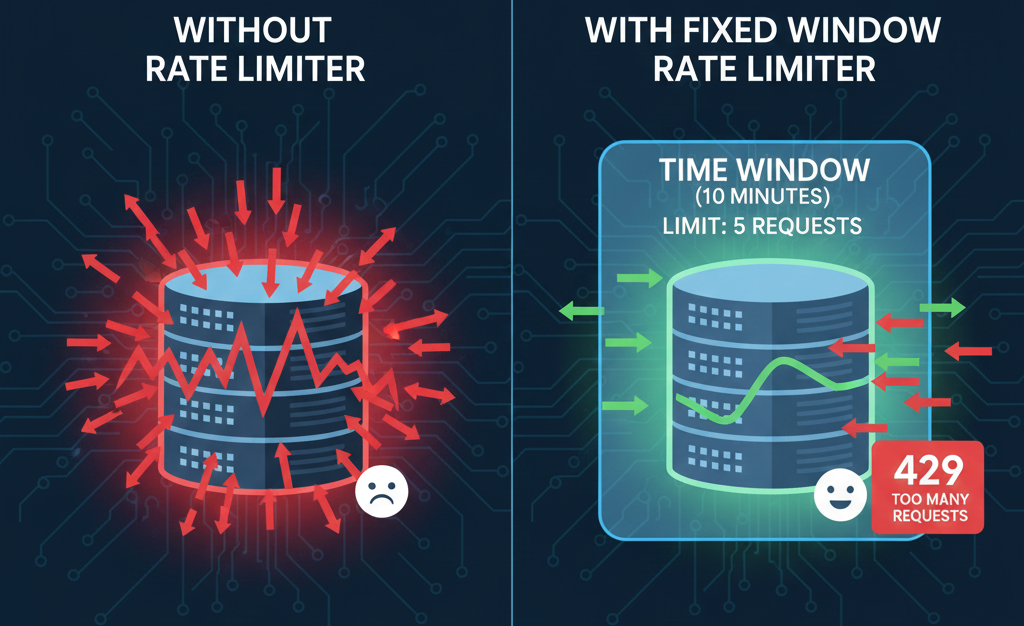
Fixed Window Rate Limiter in ASP.NET Core
How the Fixed Window Rate Limiter keeps ASP.NET Core APIs stable and controlled.
Sliding Window Rate Limiter in ASP.NET Core: What is it and when to use it?
Sliding Window Rate Limiting to balance bursty traffic and protect ASP.NET Core APIs.