Have you ever needed your API to handle a few quick requests without slowing everything down?
Sometimes users click the same button multiple times if a response feels slow. Sometimes a partner system retries a request quickly when it doesn’t receive an immediate response. And sometimes multiple background jobs start at exactly the same time. These situations create small, sudden bursts of traffic.
If your API blocks these requests too aggressively, users experience failed actions and frustration. But if the system allows unlimited bursts, it can overload the server, slow down other APIs, and degrade overall system stability.
This is where the Token Bucket Rate Limiter becomes valuable. It allows your API to accept short bursts of traffic up to a safe limit, while still controlling the long-term request rate. This makes it ideal for real-world usage patterns without compromising system reliability.
This blog explains how the Token Bucket limiter works in ASP.NET Core and when it’s the right choice for managing bursty traffic.
Rate Limiting: What Is It?
Rate limiting controls how often users or systems can call an API.
It helps the system stay secure and stable when:
Traffic suddenly increases
Scripts or scheduled jobs repeatedly make calls
Brute-force attacks or accidental request floods occur
With rate limiting in place, the API stays fair and consistent for all clients.
For a general introduction to ASP.NET Core rate limiting, refer to the first blog in this series:
What Is a Token Bucket rate limiter?
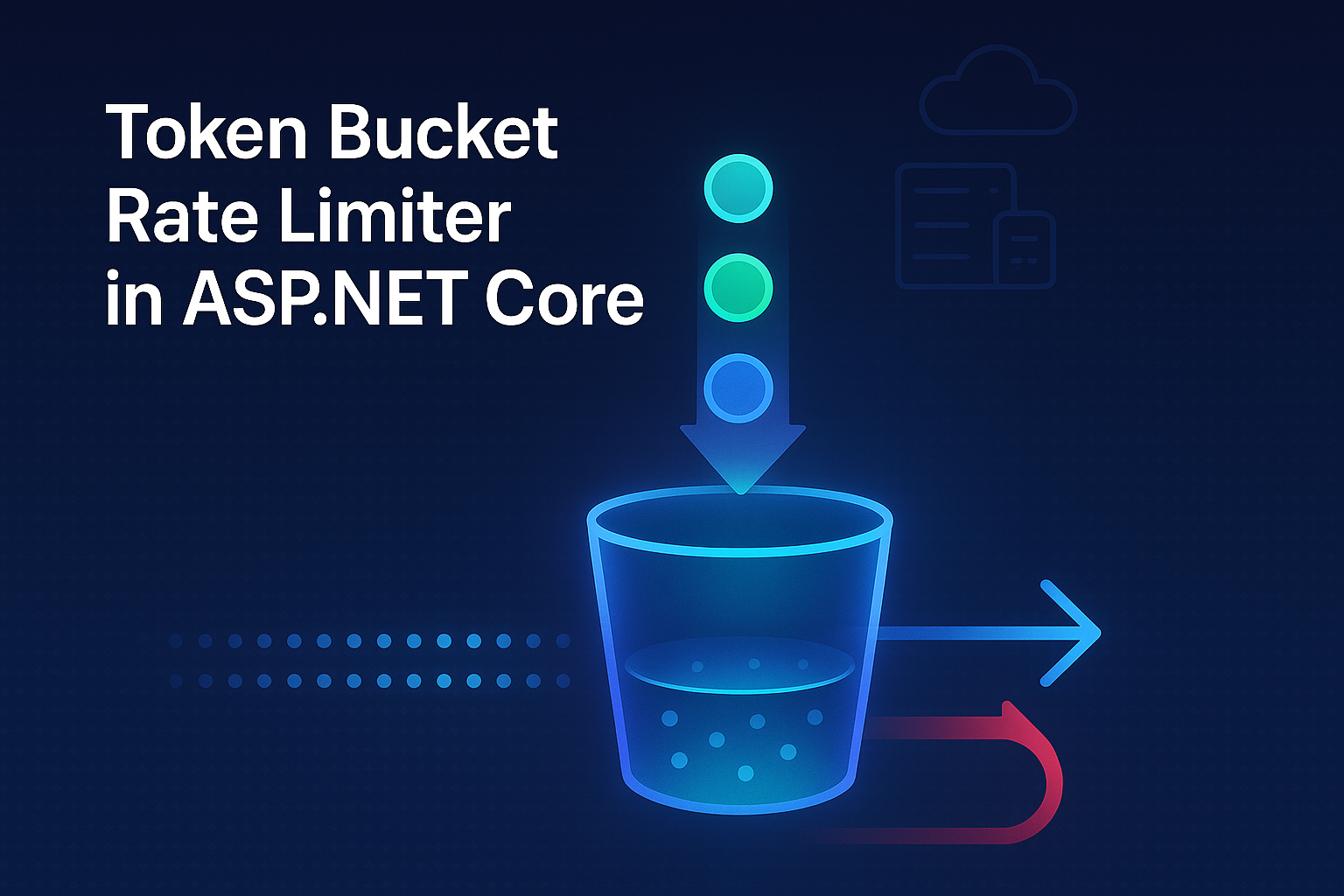
The Token Bucket Rate Limiter is designed to allow small, natural bursts of traffic while still controlling the overall request rate.
Instead of using fixed time limits, the system keeps a bucket that slowly fills with tokens. Every request uses one token. If there are tokens available, the request is allowed. When the bucket becomes empty, new requests have to wait until more tokens are added.
This keeps request flow balanced and flexible, so the API can handle quick user actions without putting too much load on the system.

Think of the token bucket as a water container.
Water drops (tokens) slowly fill the tank.
The bucket can only hold a limited amount of water.
Each request uses one drop of water.
If the bucket becomes empty, the system stops accepting new requests.
This means the system can handle quick, small bursts such as 5–10 requests, but still controls traffic over time.
Example Scenario
Consider an API that generates an Inventory Report.
This report takes time to process and reads multiple database tables. On a normal day, the system gets only two to five report requests every ten minutes. That’s easy to handle.
But real users sometimes behave differently. If the report takes longer than expected, a user might click the button again. A partner system might retry the same call quickly because it didn’t get a response in time.
Sometimes multiple calls arrive at almost the same moment. This creates small bursts of traffic-maybe four or five requests in just a few seconds. Even though the total number of requests is still low, these sudden bursts cause extra load on the database and slow down the report generation process.
Other APIs that use the same database also start becoming slower. This affects the overall performance of the system.
What happened without a rate limiter?
When these bursts happened, the API accepted all requests immediately. This caused:
CPU usage to jump suddenly
Database queries to slow down
Report generation to take longer
Other APIs to slow down
Users to see delays or timeouts
The problem wasn’t high traffic.
The problem was several heavy tasks starting at the same time.
What happened after adding a Token Bucket limiter?
After seeing traffic spikes impact the Inventory Report API, we added a Token Bucket rate limiter to manage the flow.
It now handles bursts of up to five requests smoothly and returns a 429 response for any excess traffic.
Tokens were added at a steady rate. Each request used one token. If tokens were available, the system allowed the request. If not, the request was rejected until tokens were added again.
This made things much smoother:
Small user bursts were allowed
Too many back-to-back requests were blocked
The database stayed healthy
Report generation became steady again
Other APIs stopped slowing down
System performance became consistent
The Token Bucket limiter let the system handle real-world behavior without overloading the server.
Below is a sample implementation
// No additional package installation is required.
// Rate limiting is built into ASP.NET Core starting from .NET 7.

using Microsoft.AspNetCore.RateLimiting;

var builder = WebApplication.CreateBuilder(args);

builder.Services.AddControllers();
builder.Services.AddEndpointsApiExplorer();

builder.Services.AddRateLimiter(options =>
{
    options.AddTokenBucketLimiter(
        "InventoryReportLimit",
        limiterOptions =>
        {
            limiterOptions.TokenLimit = 5;
            limiterOptions.TokensPerPeriod = 2;
            limiterOptions.ReplenishmentPeriod = TimeSpan.FromSeconds(60);
            limiterOptions.AutoReplenishment = true;

            // No queuing — requests exceeding the limit are rejected immediately
            limiterOptions.QueueLimit = 0;

            // If QueueLimit > 0, you can control processing order:
            // limiterOptions.QueueProcessingOrder = QueueProcessingOrder.OldestFirst;
        });

    options.OnRejected = async (context, cancellationToken) =>
    {
        context.HttpContext.Response.StatusCode =
            StatusCodes.Status429TooManyRequests;

        await context.HttpContext.Response.WriteAsync(
            "Too many report requests. Try again later.",
            cancellationToken);
    };
});

var app = builder.Build();

app.UseRouting();
app.UseRateLimiter();

app.MapControllers();

app.Run();
Setting | Meaning (Token Bucket limiter) |
TokenLimit | Maximum number of tokens the bucket can hold. Defines the burst capacity. |
TokensPerPeriod | Number of tokens added during each replenishment period. |
ReplenishmentPeriod | How often tokens are added to the bucket. |
AutoReplenishment | Automatically refills tokens without manual intervention |
QueueLimit | Maximum number of requests allowed to wait when no tokens are available. A value of 0 means requests are rejected immediately instead of being queued. |
QueueProcessingOrder | Determines how queued requests are processed. OldestFirst processes requests in FIFO order, ensuring fairness when queuing is enabled. |
This configuration allows short bursts while limiting the long-term request rate.
Advantages of Token Bucket rate limiter?
Allows short bursts without immediately rejecting requests
If multiple requests arrive at the same time, the limiter can allow them as long as tokens are available. This helps in real-world situations like quick retries or repeated button clicks.
Prevents sustained overload
Even though bursts are allowed, the refill rate controls long-term traffic. If requests keep coming continuously, tokens run out and the system starts rejecting them. This protects CPU, threads, and database resources.
Better suited for unpredictable traffic patterns
In production, traffic is rarely smooth. Users, background jobs, or partner systems can create small spikes. Token Bucket handles these more gracefully than strict window-based limiters.
Clear control over burst capacity
The TokenLimit setting makes it easy to define how many simultaneous requests your system can tolerate. This gives better alignment with infrastructure capacity.
When should you use the Token Bucket limiter?
Use it when small bursts are acceptable, but continuous high traffic is not.
User-facing APIs where duplicate clicks or quick retries are common.
Partner integrations that retry requests if a response is delayed.
Scheduled background jobs that may trigger at the same time.
Endpoints performing heavy operations, where sustained load is more dangerous than short spikes.
When should you avoid using a Token Bucket limiter?
Avoid it when burst traffic itself can cause problems.
If traffic must remain evenly distributed over time, a Sliding Window approach is safer.
If you need strict “X requests per minute” enforcement with no burst allowance, Fixed Window is better.
If your concern is limiting parallel execution rather than request rate, use a Concurrency limiter instead.
Benchmark: Token Bucket Rate Limiter (Local Runtime Test)
A lightweight benchmark was executed locally using Visual Studio Diagnostic Tools to observe behavior under burst load.
Test Environment
Environment: Local development machine
Framework: ASP.NET Core
Monitoring: Visual Studio Diagnostic Tools (Debug mode)
Endpoint: Inventory Report API
Test Scenarios
The benchmark simulates load on the Inventory Summary Report API, which performs multiple joins and aggregation queries across inventory and transaction tables.
To replicate real-world usage, the following pattern was used:
Concurrent requests: 20 simultaneous report generation requests
Traffic pattern: Short burst triggered within a 5-second window
Average report execution time (without limiter): ~3–4 seconds
Rate limit configuration:
TokenLimit = 5
TokensPerPeriod = 5
ReplenishmentPeriod = 1 minute
QueueLimit = 0
This configuration allows up to 5 reports to start immediately while preventing large spikes from overwhelming the database server.
Metric Category | Metric | Without Rate Limiter | Token Bucket Rate Limiter |
CPU Usage | Peak CPU Usage | 72% | 56% |
Average CPU Usage | 35-40% | 18–24% | |
Thread Pool | Peak Threads | 45 | 21 |
Thread Starvation | Yes | No | |
Requests | Successful Requests | 100% (slow) | 14% |
Rejected (429) | 0 | 86% | |
Response Time | P95 | 9.8s | 1.4s |
The reduced P95 includes rejected (429) responses, which return significantly faster than full report execution.
Note: These benchmarks were captured on a local development machine using Visual Studio Diagnostic Tools. Results may vary based on hardware, workload, and runtime configuration.
Summary
The Token Bucket Rate Limiter is a flexible and simple way to control API traffic. It lets your system handle natural user behavior-like quick clicks or retries-while still protecting it from sudden overload.
It is perfect for real-world situations where small bursts are normal but too many requests at once could cause problems.
If you want to learn more, explore the blogs Fixed Window, Sliding Window and Concurrency Limiters.
FAQs
Q1: How do I decide the correct TokenLimit and refill rate?
A: Choose the ‘TokenLimit’ based on how many requests the system can handle at once, and set the ‘TokensPerPeriod’ and ‘ReplenishmentPeriod’ based on the average request rate expected over time.
The TokenLimit controls short bursts, while the TokensPerPeriod controls sustained traffic.
Start with conservative values, monitor real traffic, and adjust based on performance and usage patterns.
Q2: Can Token Bucket smooth traffic or only allow bursts?
A: Token Bucket primarily allows bursts, not smooths them.
If traffic smoothing is your goal (even distribution over time), Sliding Window is a better choice.
Token Bucket is best when:
Small bursts are acceptable
Users or systems retry quickly
Short spikes should not be blocked immediately
Q3: What happens if tokens refill faster than requests arrive?
A: If the system receives fewer requests than the refill rate:
The bucket gradually fills up
Once full, additional tokens are discarded
This keeps the system prepared to handle sudden spikes in traffic.
Q4: Does Token Bucket guarantee fairness between clients?
A: Not by default.
If all clients share the same limiter policy, a single aggressive client could consume most tokens.
To improve fairness:
Apply rate limiting per IP, user, or API key
Use partitioned rate limiting policies in ASP.NET Core
This ensures each client receives its own token bucket instead of sharing one global bucket.
Q5: Is Token Bucket safe for very expensive operations?
A: Use it carefully
If a single request consumes a lot of CPU or runs heavy database queries, allowing burst traffic can still overload backend systems.
In such cases:
Reduce the TokenLimit to allow smaller bursts
Combine Token Bucket with a Concurrency limiter to control parallel execution
Use a Sliding Window limiter for smoother traffic control
This helps protect downstream services while keeping the API stable.
References
Related Blogs

Introduction To Rate Limiting Middleware in ASP.NET Core
Discover how rate limiting middleware boosts performance in ASP.NET Core
Fixed Window Rate Limiter in ASP.NET Core
How the Fixed Window Rate Limiter keeps ASP.NET Core APIs stable and controlled.
Sliding Window Rate Limiter in ASP.NET Core: What is it and when to use it?
Sliding Window Rate Limiting to balance bursty traffic and protect ASP.NET Core APIs.